> ## Documentation Index
> Fetch the complete documentation index at: https://docs.campfire.ai/llms.txt
> Use this file to discover all available pages before exploring further.
# OAuth Apps
> Let people connect your software to Campfire with OAuth 2.0 instead of sharing API keys
OAuth apps let your own software, or a third-party tool, act in Campfire **on behalf of a real person** without anyone sharing a password or an API key. Each person who connects your app sees exactly what it is asking for, picks the workspace it acts in, and can disconnect it at any time. Every request the app makes shows up in a per-connection activity log.
Campfire implements the standard OAuth 2.0 **authorization code** flow with refresh tokens and optional PKCE, so any OAuth 2.0 client library will work.
A single key for a dedicated API user in your own workspace. Best for internal scripts and back-office jobs.
Each person authorizes your app themselves, with scoped, revocable, audited access. Best for integrations that other people connect to.
## How it works
A workspace admin creates the app in Campfire, picks the most it may ever access (its **scopes**), and gets a **client ID** and **client secret**.
Your app sends the person to Campfire's authorize URL. They sign in, review what the app is asking for, choose a workspace, and click **Authorize**.
Campfire redirects back to your app with a one-time `code`. Your server exchanges it, along with the client secret, for an **access token** (valid for 1 hour) and a **refresh token** (valid for 30 days).
Your app sends `Authorization: Bearer ` on API requests. Campfire treats each request as that person in the chosen workspace, limited to the scopes they granted.
Creating and managing OAuth apps requires a Campfire **admin**. Anyone in a workspace can **authorize** an app, but the app can never do more than that person is already allowed to do.
## Part 1: Register your app
Go to [Settings > Developer > Apps](https://app.meetcampfire.com/v2/settings/apps). If you haven't created an app yet, you'll see the empty state. Click **Create App**. Once you have at least one app, the button is **New App** in the top right.
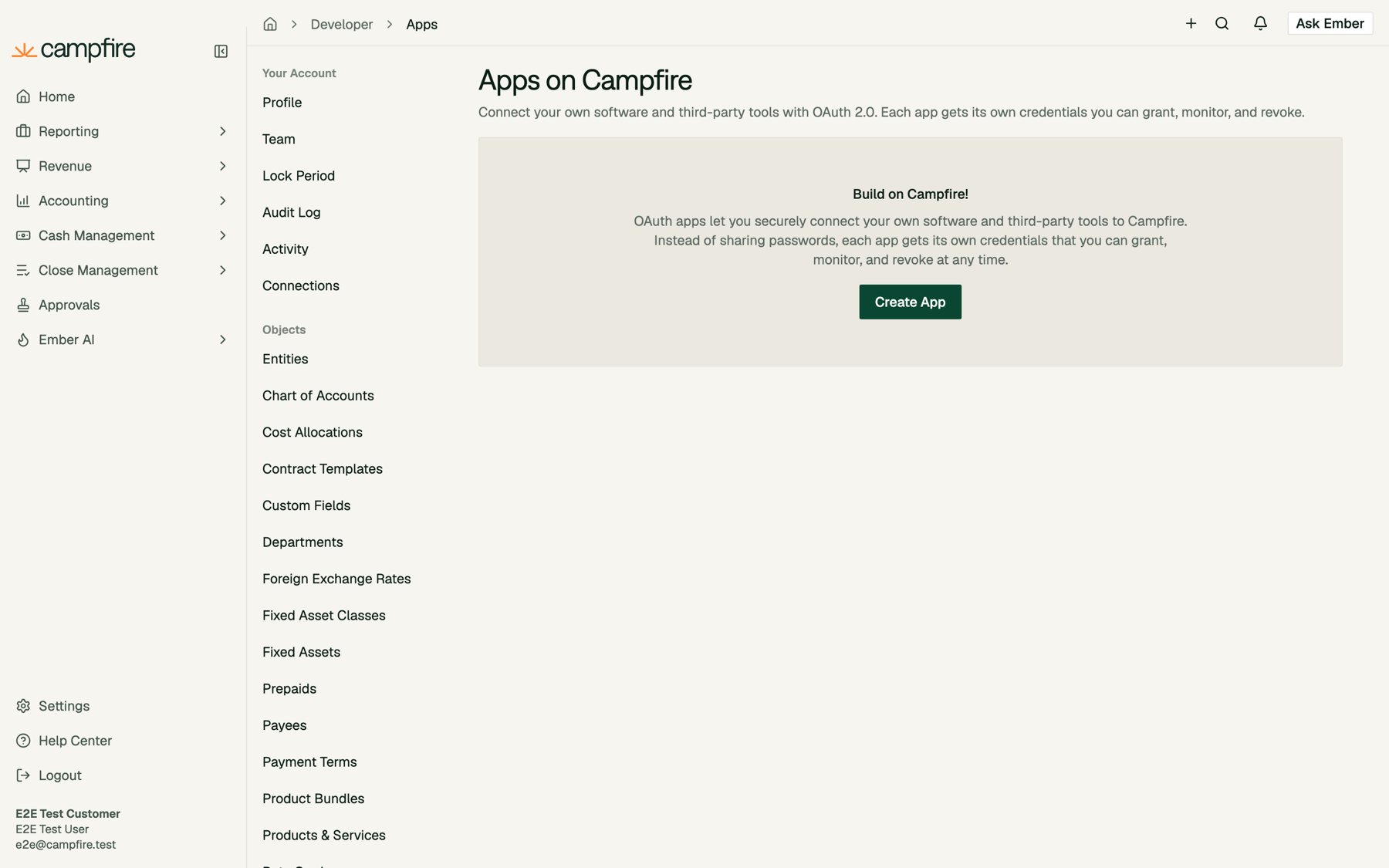 If you don't see **Apps** under **Developer**, contact your Campfire support team to have OAuth apps turned on for your workspace.
The **Details** tab describes your app to the people who will authorize it.
If you don't see **Apps** under **Developer**, contact your Campfire support team to have OAuth apps turned on for your workspace.
The **Details** tab describes your app to the people who will authorize it.
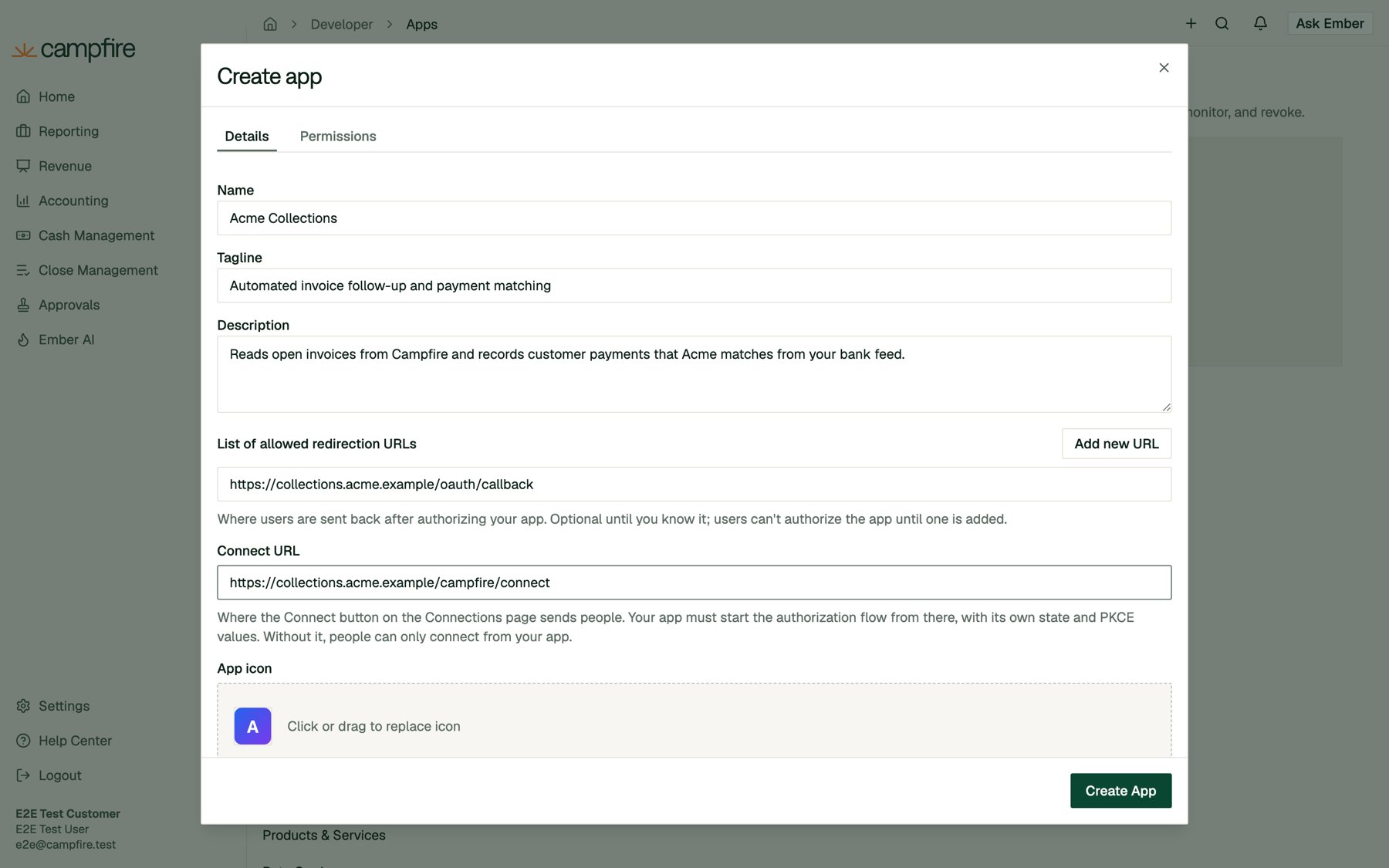 | Field | Required | What it's for |
| - | - | - |
| **Name** | Yes | Shown on the consent screen, the Connections page, and the activity log. |
| **Tagline** | No | One line (up to 120 characters) shown under the name on the app card and the consent screen. |
| **Description** | No | Up to 2,000 characters that help your colleagues recognize what the app does. Shown on the connection's detail page. |
| **List of allowed redirection URLs** | To authorize | Where Campfire sends people back after they approve or deny access. Add up to 20 with **Add new URL**. People can't authorize the app until at least one is added. |
| **Connect URL** | No | Where the **Connect** button on Campfire's Connections page sends people. See [Starting from Campfire](#starting-the-flow-from-campfire). |
| **App icon** | No | PNG, JPG, GIF, or WEBP, up to 1 MB. Shown on the consent screen and the Connections page. |
| **Published** | No | Off by default. See [Private vs. published apps](#private-vs-published-apps). |
| Field | Required | What it's for |
| - | - | - |
| **Name** | Yes | Shown on the consent screen, the Connections page, and the activity log. |
| **Tagline** | No | One line (up to 120 characters) shown under the name on the app card and the consent screen. |
| **Description** | No | Up to 2,000 characters that help your colleagues recognize what the app does. Shown on the connection's detail page. |
| **List of allowed redirection URLs** | To authorize | Where Campfire sends people back after they approve or deny access. Add up to 20 with **Add new URL**. People can't authorize the app until at least one is added. |
| **Connect URL** | No | Where the **Connect** button on Campfire's Connections page sends people. See [Starting from Campfire](#starting-the-flow-from-campfire). |
| **App icon** | No | PNG, JPG, GIF, or WEBP, up to 1 MB. Shown on the consent screen and the Connections page. |
| **Published** | No | Off by default. See [Private vs. published apps](#private-vs-published-apps). |
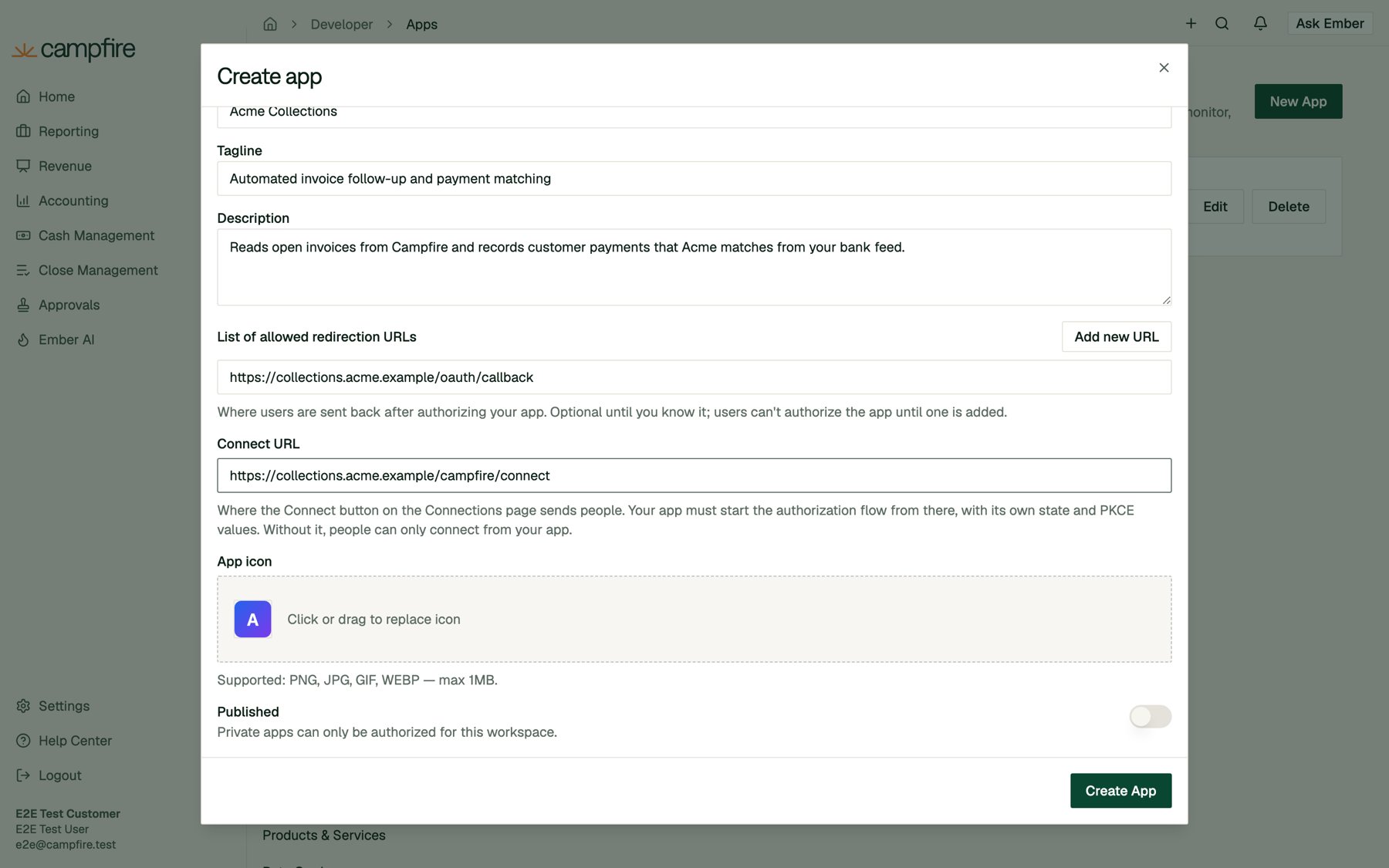 Redirect URLs and the Connect URL must use `https`. Plain `http` is accepted only for `localhost`, `127.0.0.1`, and `[::1]`, so you can develop locally. URLs can't contain a `#fragment` or embedded credentials. At authorization time the `redirect_uri` must **exactly** match one of the registered URLs, except that loopback addresses (`127.0.0.1`, `[::1]`) may use any port.
Switch to the **Permissions** tab and check the access your app needs. These scopes are the **ceiling**: the most the app can ever request. People connecting the app are still limited to their own permissions in the workspace they choose.
Redirect URLs and the Connect URL must use `https`. Plain `http` is accepted only for `localhost`, `127.0.0.1`, and `[::1]`, so you can develop locally. URLs can't contain a `#fragment` or embedded credentials. At authorization time the `redirect_uri` must **exactly** match one of the registered URLs, except that loopback addresses (`127.0.0.1`, `[::1]`) may use any port.
Switch to the **Permissions** tab and check the access your app needs. These scopes are the **ceiling**: the most the app can ever request. People connecting the app are still limited to their own permissions in the workspace they choose.
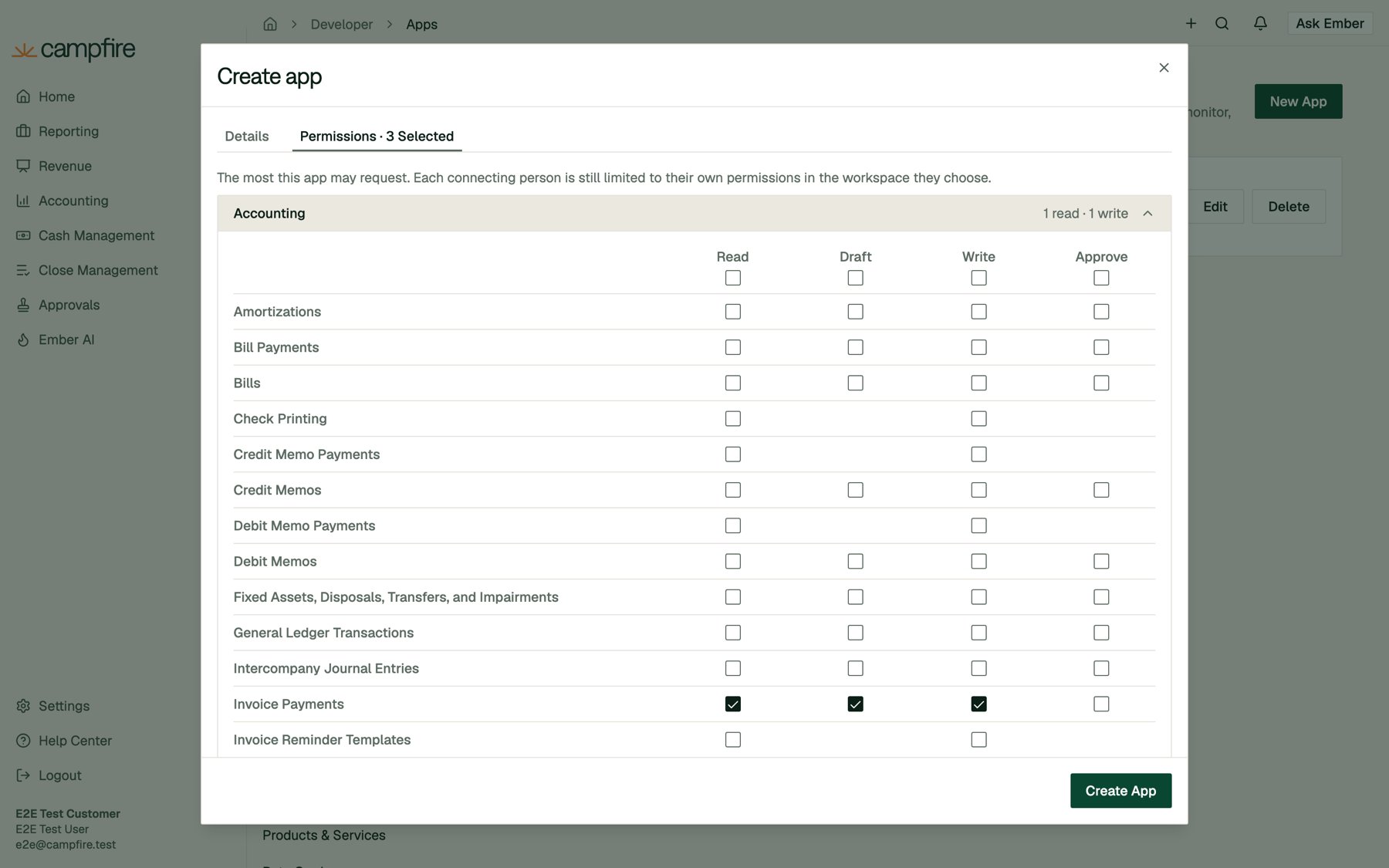 Permissions are grouped by module (Accounting, Revenue, Reports, Cash Management, Close Management, Organization, Ember AI). Each row is a resource, and each column is an access tier:
| Tier | Grants |
| - | - |
| **Read** | View the resource. |
| **Draft** | Propose changes that go through Campfire's approval workflow. The app's writes are saved as drafts for someone to approve. |
| **Write** | Create, edit, and delete the resource. |
| **Approve** | Approve proposed changes to the resource. This is separate from the other tiers and only granted on its own. |
A higher tier includes the lower ones. For example, checking **Write** on Invoice Payments also checks **Read** and **Draft**. Only check what your integration actually uses. You can widen the scopes later without affecting existing connections.
You can create an app with **no** permissions. It can then only confirm who signed in and which workspace they chose, which is useful for "Sign in with Campfire" style identity checks.
Click **Create App**. Campfire shows the app's credentials:
Permissions are grouped by module (Accounting, Revenue, Reports, Cash Management, Close Management, Organization, Ember AI). Each row is a resource, and each column is an access tier:
| Tier | Grants |
| - | - |
| **Read** | View the resource. |
| **Draft** | Propose changes that go through Campfire's approval workflow. The app's writes are saved as drafts for someone to approve. |
| **Write** | Create, edit, and delete the resource. |
| **Approve** | Approve proposed changes to the resource. This is separate from the other tiers and only granted on its own. |
A higher tier includes the lower ones. For example, checking **Write** on Invoice Payments also checks **Read** and **Draft**. Only check what your integration actually uses. You can widen the scopes later without affecting existing connections.
You can create an app with **no** permissions. It can then only confirm who signed in and which workspace they chose, which is useful for "Sign in with Campfire" style identity checks.
Click **Create App**. Campfire shows the app's credentials:
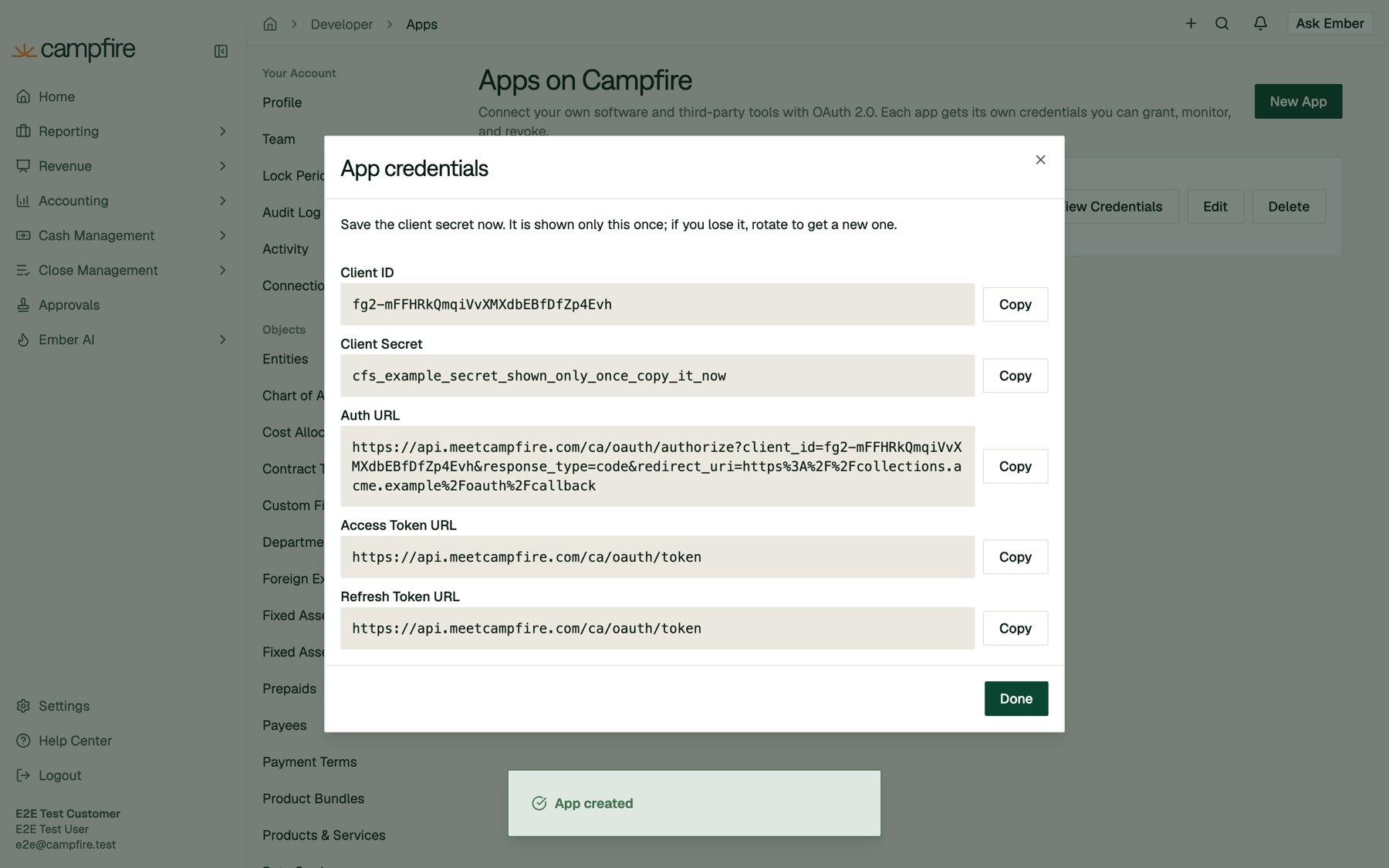 | Credential | Use |
| - | - |
| **Client ID** | Public identifier for your app. Safe to include in URLs. |
| **Client Secret** | Proves your server is the app. Keep it in a secret store and never ship it to a browser or mobile app. |
| **Auth URL** | A ready-made authorize URL for your first redirect URL. Add `state`, `scope`, and PKCE parameters as shown below. |
| **Access Token URL** / **Refresh Token URL** | `https://api.meetcampfire.com/ca/oauth/token`. The same endpoint handles both grants. |
**The client secret is shown only once.** Copy it before you click **Done**. If you lose it, rotate it to get a new one (see [Rotating the client secret](#rotating-the-client-secret)).
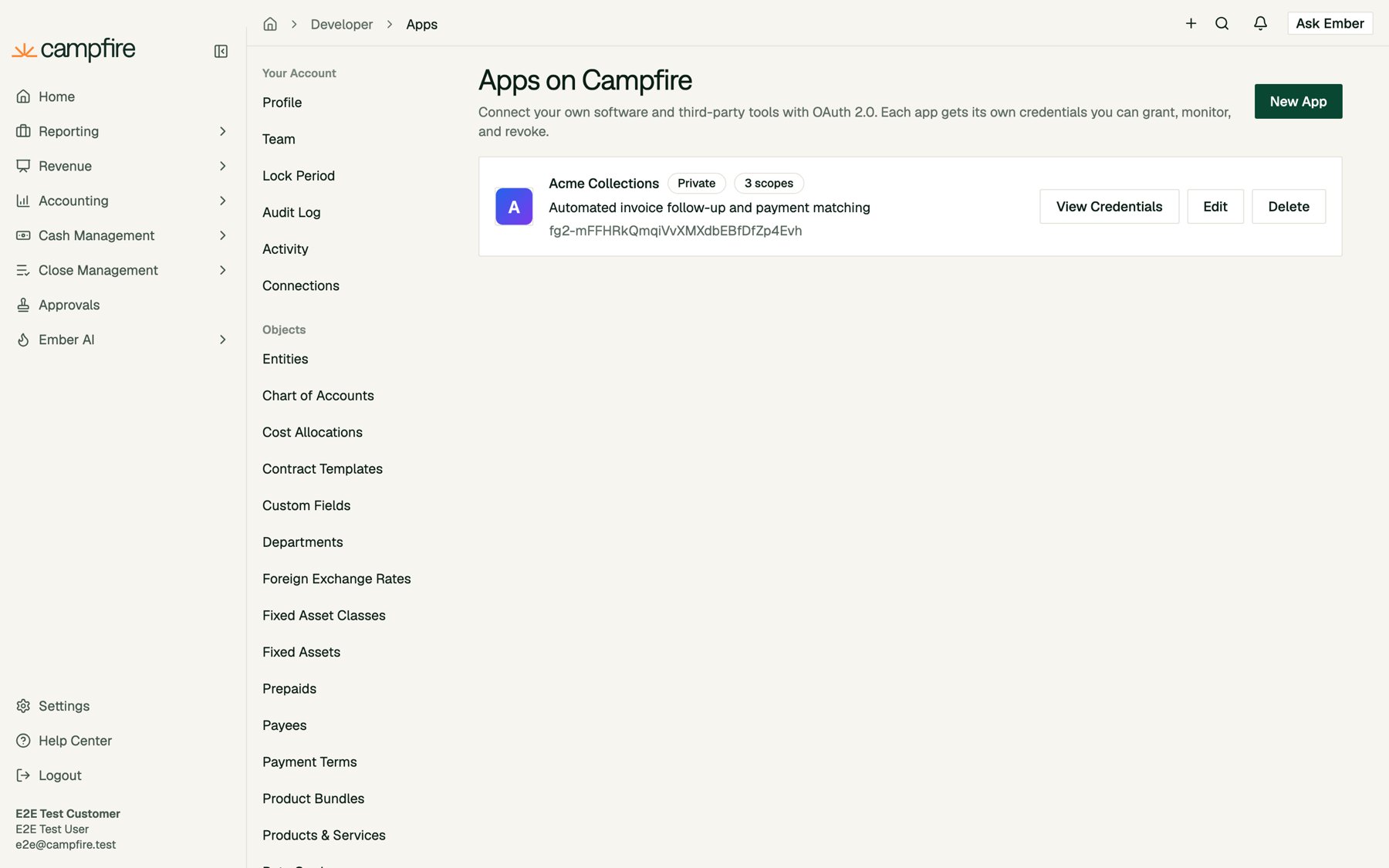
Your app now appears on the Apps page with its sharing status, scope count, and client ID:
| Credential | Use |
| - | - |
| **Client ID** | Public identifier for your app. Safe to include in URLs. |
| **Client Secret** | Proves your server is the app. Keep it in a secret store and never ship it to a browser or mobile app. |
| **Auth URL** | A ready-made authorize URL for your first redirect URL. Add `state`, `scope`, and PKCE parameters as shown below. |
| **Access Token URL** / **Refresh Token URL** | `https://api.meetcampfire.com/ca/oauth/token`. The same endpoint handles both grants. |
**The client secret is shown only once.** Copy it before you click **Done**. If you lose it, rotate it to get a new one (see [Rotating the client secret](#rotating-the-client-secret)).
Your app now appears on the Apps page with its sharing status, scope count, and client ID:
 ## Part 2: Implement the authorization flow
The examples below use these endpoints:
| Purpose | Method and URL |
| - | - |
| Authorize | `GET https://api.meetcampfire.com/ca/oauth/authorize` |
| Exchange a code or refresh a token | `POST https://api.meetcampfire.com/ca/oauth/token` |
| Call the API | Any supported endpoint on `https://api.meetcampfire.com`, with `Authorization: Bearer ` |
### Step 1: Send the person to Campfire
Generate a random `state` value and a PKCE verifier, store both in the person's session, then redirect them to the authorize endpoint:
```text theme={null}
https://api.meetcampfire.com/ca/oauth/authorize
?client_id=YOUR_CLIENT_ID
&redirect_uri=https%3A%2F%2Fyour-app.com%2Foauth%2Fcallback
&response_type=code
&scope=invoices%3Aread%20invoice_payments%3Awrite%20vendors%3Aread
&state=RANDOM_STATE
&code_challenge=BASE64URL_SHA256_OF_VERIFIER
&code_challenge_method=S256
```
| Parameter | Required | Notes |
| - | - | - |
| `client_id` | Yes | From the credentials dialog. |
| `redirect_uri` | Yes | Must exactly match a registered redirect URL. |
| `response_type` | Yes | Always `code`. |
| `state` | Strongly recommended | An unguessable value (up to 4,096 characters) that you check on the way back to prevent CSRF. |
| `scope` | No | Space-separated scopes. Must be within the app's permissions. If omitted, Campfire requests all of the app's permissions. |
| `code_challenge` | Recommended | Base64url-encoded SHA-256 of your `code_verifier`, without padding (43 characters). |
| `code_challenge_method` | With `code_challenge` | Must be `S256`. `plain` is not supported. |
PKCE is optional for apps that authenticate with a client secret, but we recommend always using it. If you send a `code_challenge`, you must send the matching `code_verifier` when you exchange the code.
Here is how to generate the PKCE pair:
```python Python theme={null}
import base64, hashlib, secrets
code_verifier = secrets.token_urlsafe(48) # 43-128 characters
code_challenge = base64.urlsafe_b64encode(
hashlib.sha256(code_verifier.encode()).digest()
).rstrip(b"=").decode()
state = secrets.token_urlsafe(24)
```
```javascript Node.js theme={null}
import crypto from "node:crypto";
const codeVerifier = crypto.randomBytes(48).toString("base64url"); // 43-128 characters
const codeChallenge = crypto.createHash("sha256").update(codeVerifier).digest("base64url");
const state = crypto.randomBytes(24).toString("base64url");
```
### Step 2: The person approves access
If the person isn't signed in, Campfire asks them to sign in first. They then see the consent screen, which shows your app's icon, name, tagline, and a plain-language list of what it will be able to do:
## Part 2: Implement the authorization flow
The examples below use these endpoints:
| Purpose | Method and URL |
| - | - |
| Authorize | `GET https://api.meetcampfire.com/ca/oauth/authorize` |
| Exchange a code or refresh a token | `POST https://api.meetcampfire.com/ca/oauth/token` |
| Call the API | Any supported endpoint on `https://api.meetcampfire.com`, with `Authorization: Bearer ` |
### Step 1: Send the person to Campfire
Generate a random `state` value and a PKCE verifier, store both in the person's session, then redirect them to the authorize endpoint:
```text theme={null}
https://api.meetcampfire.com/ca/oauth/authorize
?client_id=YOUR_CLIENT_ID
&redirect_uri=https%3A%2F%2Fyour-app.com%2Foauth%2Fcallback
&response_type=code
&scope=invoices%3Aread%20invoice_payments%3Awrite%20vendors%3Aread
&state=RANDOM_STATE
&code_challenge=BASE64URL_SHA256_OF_VERIFIER
&code_challenge_method=S256
```
| Parameter | Required | Notes |
| - | - | - |
| `client_id` | Yes | From the credentials dialog. |
| `redirect_uri` | Yes | Must exactly match a registered redirect URL. |
| `response_type` | Yes | Always `code`. |
| `state` | Strongly recommended | An unguessable value (up to 4,096 characters) that you check on the way back to prevent CSRF. |
| `scope` | No | Space-separated scopes. Must be within the app's permissions. If omitted, Campfire requests all of the app's permissions. |
| `code_challenge` | Recommended | Base64url-encoded SHA-256 of your `code_verifier`, without padding (43 characters). |
| `code_challenge_method` | With `code_challenge` | Must be `S256`. `plain` is not supported. |
PKCE is optional for apps that authenticate with a client secret, but we recommend always using it. If you send a `code_challenge`, you must send the matching `code_verifier` when you exchange the code.
Here is how to generate the PKCE pair:
```python Python theme={null}
import base64, hashlib, secrets
code_verifier = secrets.token_urlsafe(48) # 43-128 characters
code_challenge = base64.urlsafe_b64encode(
hashlib.sha256(code_verifier.encode()).digest()
).rstrip(b"=").decode()
state = secrets.token_urlsafe(24)
```
```javascript Node.js theme={null}
import crypto from "node:crypto";
const codeVerifier = crypto.randomBytes(48).toString("base64url"); // 43-128 characters
const codeChallenge = crypto.createHash("sha256").update(codeVerifier).digest("base64url");
const state = crypto.randomBytes(24).toString("base64url");
```
### Step 2: The person approves access
If the person isn't signed in, Campfire asks them to sign in first. They then see the consent screen, which shows your app's icon, name, tagline, and a plain-language list of what it will be able to do:
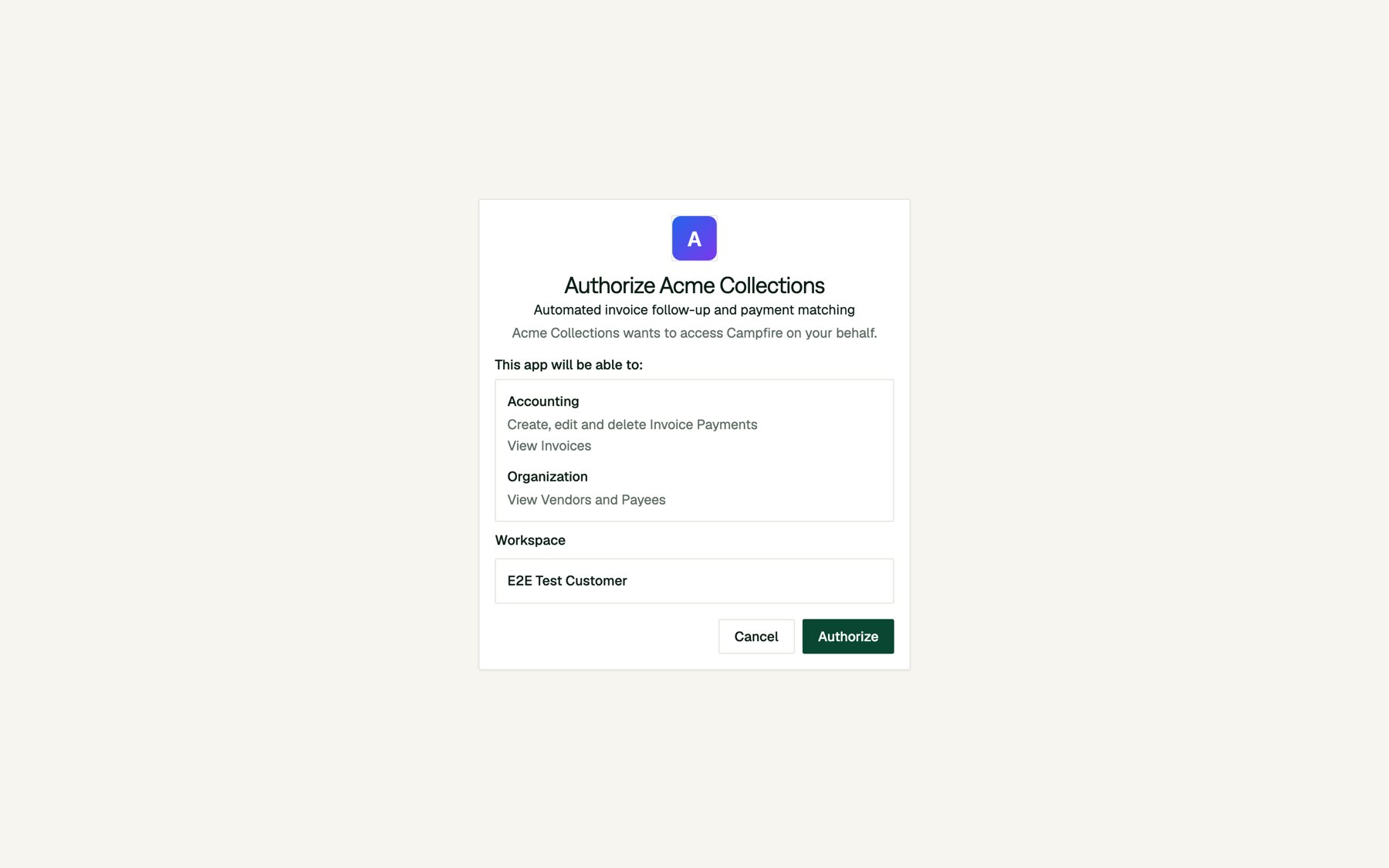 * **Workspace.** For a private app, the workspace is fixed to the one that created the app. For a published and approved app, the person picks one of the workspaces they belong to.
* **Authorize** redirects to your `redirect_uri` with `code` and `state`:
```text theme={null}
https://your-app.com/oauth/callback?code=I9feIWu7cmfy...&state=RANDOM_STATE
```
* **Cancel** redirects to your `redirect_uri` with an error:
```text theme={null}
https://your-app.com/oauth/callback?error=access_denied&error_description=The+user+declined+to+authorize+the+app.&state=RANDOM_STATE
```
Before doing anything else in your callback, **check that `state` matches the value you stored.** If it doesn't, discard the code.
### Step 3: Exchange the code for tokens
From your server, `POST` the code to the token endpoint within **5 minutes**. Each code can be used only once. Authenticate with your client ID and secret, either with HTTP Basic auth (shown) or as `client_id` and `client_secret` form fields:
```bash theme={null}
curl -X POST https://api.meetcampfire.com/ca/oauth/token \
-u "$CAMPFIRE_CLIENT_ID:$CAMPFIRE_CLIENT_SECRET" \
-d grant_type=authorization_code \
-d code="$CODE" \
-d redirect_uri="https://your-app.com/oauth/callback" \
-d code_verifier="$CODE_VERIFIER"
```
```json theme={null}
{
"access_token": "cfa_YOUR_ACCESS_TOKEN",
"token_type": "Bearer",
"expires_in": 3600,
"scope": "invoice_payments:write invoices:read vendors:read",
"refresh_token": "cfr_YOUR_REFRESH_TOKEN"
}
```
Access tokens start with `cfa_` and refresh tokens start with `cfr_`. Store both securely on your server, keyed to the person who connected. The `scope` field lists exactly what was granted.
### Step 4: Call the API
Send the access token as a bearer token:
```bash theme={null}
curl https://api.meetcampfire.com/coa/api/v1/invoice/ \
-H "Authorization: Bearer $ACCESS_TOKEN"
```
To find out who connected and which workspace they chose, call the permissions endpoint. This works for every app, including apps with no scopes:
```bash theme={null}
curl https://api.meetcampfire.com/users/api/get-user-permissions \
-H "Authorization: Bearer $ACCESS_TOKEN"
```
```json theme={null}
{
"id": 45460,
"name": "Jordan Lee",
"email": "jordan@example.com",
"approval_required": false,
"can_edit": false,
"tenant": {
"id": 53,
"name": "Example Co",
"type": "PRODUCTION",
"logo_url": null
},
"app": {
"client_id": "fg2-mFFHRkQmqiVvXMXdbEBfDfZp4Evh",
"scopes": ["invoice_payments:write", "invoices:read", "vendors:read"]
},
"permissions": {
"chart_of_accounts.accountinginvoice": "read",
"chart_of_accounts.accountingbill": "none"
}
}
```
The `permissions` map is the effective access for this token: the person's own permissions intersected with the granted scopes. The response above is shortened.
**What a request can do.** Each request runs as the person who authorized the app, in the workspace they chose. It can do only what **both** that person's role and the granted scopes allow. An app never inherits admin privileges, even when an admin authorizes it.
**When a scope is missing,** Campfire returns `403` and tells you which scope you need in the `WWW-Authenticate` header:
```http theme={null}
HTTP/1.1 403 Forbidden
WWW-Authenticate: Bearer realm="api", error="insufficient_scope", scope="bills:read"
{"detail": "You do not have permission to perform this action."}
```
Some endpoints are not available to OAuth apps and return `403` with `"This endpoint is not available to OAuth apps."` Account and credential management (API keys, OAuth app management, connections) is never available to app tokens.
### Step 5: Refresh the access token
Access tokens expire after **1 hour**. Use the refresh token to get a new pair:
```bash theme={null}
curl -X POST https://api.meetcampfire.com/ca/oauth/token \
-u "$CAMPFIRE_CLIENT_ID:$CAMPFIRE_CLIENT_SECRET" \
-d grant_type=refresh_token \
-d refresh_token="$REFRESH_TOKEN"
```
The response has the same shape as the code exchange and contains a **new** refresh token.
**Refresh tokens rotate and can be used only once.** Each refresh revokes the old pair, so save the new refresh token before you use the new access token. If an old refresh token is ever reused, Campfire assumes it was stolen and revokes **every** token for that connection:
```json theme={null}
{"error": "invalid_grant", "error_description": "Refresh token was already used; re-authorize the app."}
```
The person must then authorize the app again. If several workers share a connection, make sure only one of them refreshes at a time.
Refresh tokens expire after **30 days**. Refreshing regularly keeps a connection alive indefinitely, but if a connection goes unused for longer than that, the person needs to reconnect.
### Starting the flow from Campfire
If you set a **Connect URL**, people can also start from Campfire. Clicking **Connect** on your app's page under **Settings > Connections** sends them to your Connect URL. Campfire doesn't start the OAuth flow itself, because your app has to own the `state` and PKCE values. Your Connect URL should do exactly what Step 1 does: generate `state` and a verifier, store them, and redirect to the authorize URL.
```python theme={null}
@app.get("/campfire/connect")
def connect():
verifier, challenge = pkce_pair()
state = secrets.token_urlsafe(24)
session["oauth"] = {"state": state, "verifier": verifier}
return redirect(AUTHORIZE_URL + "?" + urlencode({
"client_id": CLIENT_ID,
"redirect_uri": REDIRECT_URI,
"response_type": "code",
"state": state,
"code_challenge": challenge,
"code_challenge_method": "S256",
}))
```
### A complete example
This minimal Flask app implements the whole flow: connect, callback, calling the API, and refreshing.
```python app.py theme={null}
import base64, hashlib, os, secrets
from urllib.parse import urlencode
import requests
from flask import Flask, redirect, request, session, url_for
CAMPFIRE_API = "https://api.meetcampfire.com"
CLIENT_ID = os.environ["CAMPFIRE_CLIENT_ID"]
CLIENT_SECRET = os.environ["CAMPFIRE_CLIENT_SECRET"]
REDIRECT_URI = os.environ.get("REDIRECT_URI", "http://localhost:3999/callback")
app = Flask(__name__)
app.secret_key = os.environ["FLASK_SECRET"]
def pkce_pair():
verifier = secrets.token_urlsafe(48)
challenge = base64.urlsafe_b64encode(
hashlib.sha256(verifier.encode()).digest()
).rstrip(b"=").decode()
return verifier, challenge
@app.get("/connect")
def connect():
verifier, challenge = pkce_pair()
state = secrets.token_urlsafe(24)
session["oauth"] = {"state": state, "verifier": verifier}
query = {
"client_id": CLIENT_ID,
"redirect_uri": REDIRECT_URI,
"response_type": "code",
"scope": "invoices:read invoice_payments:write vendors:read",
"state": state,
"code_challenge": challenge,
"code_challenge_method": "S256",
}
return redirect(f"{CAMPFIRE_API}/ca/oauth/authorize?{urlencode(query)}")
@app.get("/callback")
def callback():
pending = session.pop("oauth", None)
if request.args.get("error"):
return f"Campfire returned {request.args['error']}", 400
if not pending or request.args.get("state") != pending["state"]:
return "State mismatch", 400
r = requests.post(
f"{CAMPFIRE_API}/ca/oauth/token",
auth=(CLIENT_ID, CLIENT_SECRET),
data={
"grant_type": "authorization_code",
"code": request.args["code"],
"redirect_uri": REDIRECT_URI,
"code_verifier": pending["verifier"],
},
timeout=10,
)
r.raise_for_status()
session["tokens"] = r.json() # In production, store server-side, encrypted.
return redirect(url_for("home"))
@app.get("/")
def home():
tokens = session.get("tokens")
if not tokens:
return 'Connect to Campfire'
r = requests.get(
f"{CAMPFIRE_API}/users/api/get-user-permissions",
headers={"Authorization": f"Bearer {tokens['access_token']}"},
timeout=10,
)
if r.status_code == 401:
return redirect(url_for("refresh"))
return f"
* **Workspace.** For a private app, the workspace is fixed to the one that created the app. For a published and approved app, the person picks one of the workspaces they belong to.
* **Authorize** redirects to your `redirect_uri` with `code` and `state`:
```text theme={null}
https://your-app.com/oauth/callback?code=I9feIWu7cmfy...&state=RANDOM_STATE
```
* **Cancel** redirects to your `redirect_uri` with an error:
```text theme={null}
https://your-app.com/oauth/callback?error=access_denied&error_description=The+user+declined+to+authorize+the+app.&state=RANDOM_STATE
```
Before doing anything else in your callback, **check that `state` matches the value you stored.** If it doesn't, discard the code.
### Step 3: Exchange the code for tokens
From your server, `POST` the code to the token endpoint within **5 minutes**. Each code can be used only once. Authenticate with your client ID and secret, either with HTTP Basic auth (shown) or as `client_id` and `client_secret` form fields:
```bash theme={null}
curl -X POST https://api.meetcampfire.com/ca/oauth/token \
-u "$CAMPFIRE_CLIENT_ID:$CAMPFIRE_CLIENT_SECRET" \
-d grant_type=authorization_code \
-d code="$CODE" \
-d redirect_uri="https://your-app.com/oauth/callback" \
-d code_verifier="$CODE_VERIFIER"
```
```json theme={null}
{
"access_token": "cfa_YOUR_ACCESS_TOKEN",
"token_type": "Bearer",
"expires_in": 3600,
"scope": "invoice_payments:write invoices:read vendors:read",
"refresh_token": "cfr_YOUR_REFRESH_TOKEN"
}
```
Access tokens start with `cfa_` and refresh tokens start with `cfr_`. Store both securely on your server, keyed to the person who connected. The `scope` field lists exactly what was granted.
### Step 4: Call the API
Send the access token as a bearer token:
```bash theme={null}
curl https://api.meetcampfire.com/coa/api/v1/invoice/ \
-H "Authorization: Bearer $ACCESS_TOKEN"
```
To find out who connected and which workspace they chose, call the permissions endpoint. This works for every app, including apps with no scopes:
```bash theme={null}
curl https://api.meetcampfire.com/users/api/get-user-permissions \
-H "Authorization: Bearer $ACCESS_TOKEN"
```
```json theme={null}
{
"id": 45460,
"name": "Jordan Lee",
"email": "jordan@example.com",
"approval_required": false,
"can_edit": false,
"tenant": {
"id": 53,
"name": "Example Co",
"type": "PRODUCTION",
"logo_url": null
},
"app": {
"client_id": "fg2-mFFHRkQmqiVvXMXdbEBfDfZp4Evh",
"scopes": ["invoice_payments:write", "invoices:read", "vendors:read"]
},
"permissions": {
"chart_of_accounts.accountinginvoice": "read",
"chart_of_accounts.accountingbill": "none"
}
}
```
The `permissions` map is the effective access for this token: the person's own permissions intersected with the granted scopes. The response above is shortened.
**What a request can do.** Each request runs as the person who authorized the app, in the workspace they chose. It can do only what **both** that person's role and the granted scopes allow. An app never inherits admin privileges, even when an admin authorizes it.
**When a scope is missing,** Campfire returns `403` and tells you which scope you need in the `WWW-Authenticate` header:
```http theme={null}
HTTP/1.1 403 Forbidden
WWW-Authenticate: Bearer realm="api", error="insufficient_scope", scope="bills:read"
{"detail": "You do not have permission to perform this action."}
```
Some endpoints are not available to OAuth apps and return `403` with `"This endpoint is not available to OAuth apps."` Account and credential management (API keys, OAuth app management, connections) is never available to app tokens.
### Step 5: Refresh the access token
Access tokens expire after **1 hour**. Use the refresh token to get a new pair:
```bash theme={null}
curl -X POST https://api.meetcampfire.com/ca/oauth/token \
-u "$CAMPFIRE_CLIENT_ID:$CAMPFIRE_CLIENT_SECRET" \
-d grant_type=refresh_token \
-d refresh_token="$REFRESH_TOKEN"
```
The response has the same shape as the code exchange and contains a **new** refresh token.
**Refresh tokens rotate and can be used only once.** Each refresh revokes the old pair, so save the new refresh token before you use the new access token. If an old refresh token is ever reused, Campfire assumes it was stolen and revokes **every** token for that connection:
```json theme={null}
{"error": "invalid_grant", "error_description": "Refresh token was already used; re-authorize the app."}
```
The person must then authorize the app again. If several workers share a connection, make sure only one of them refreshes at a time.
Refresh tokens expire after **30 days**. Refreshing regularly keeps a connection alive indefinitely, but if a connection goes unused for longer than that, the person needs to reconnect.
### Starting the flow from Campfire
If you set a **Connect URL**, people can also start from Campfire. Clicking **Connect** on your app's page under **Settings > Connections** sends them to your Connect URL. Campfire doesn't start the OAuth flow itself, because your app has to own the `state` and PKCE values. Your Connect URL should do exactly what Step 1 does: generate `state` and a verifier, store them, and redirect to the authorize URL.
```python theme={null}
@app.get("/campfire/connect")
def connect():
verifier, challenge = pkce_pair()
state = secrets.token_urlsafe(24)
session["oauth"] = {"state": state, "verifier": verifier}
return redirect(AUTHORIZE_URL + "?" + urlencode({
"client_id": CLIENT_ID,
"redirect_uri": REDIRECT_URI,
"response_type": "code",
"state": state,
"code_challenge": challenge,
"code_challenge_method": "S256",
}))
```
### A complete example
This minimal Flask app implements the whole flow: connect, callback, calling the API, and refreshing.
```python app.py theme={null}
import base64, hashlib, os, secrets
from urllib.parse import urlencode
import requests
from flask import Flask, redirect, request, session, url_for
CAMPFIRE_API = "https://api.meetcampfire.com"
CLIENT_ID = os.environ["CAMPFIRE_CLIENT_ID"]
CLIENT_SECRET = os.environ["CAMPFIRE_CLIENT_SECRET"]
REDIRECT_URI = os.environ.get("REDIRECT_URI", "http://localhost:3999/callback")
app = Flask(__name__)
app.secret_key = os.environ["FLASK_SECRET"]
def pkce_pair():
verifier = secrets.token_urlsafe(48)
challenge = base64.urlsafe_b64encode(
hashlib.sha256(verifier.encode()).digest()
).rstrip(b"=").decode()
return verifier, challenge
@app.get("/connect")
def connect():
verifier, challenge = pkce_pair()
state = secrets.token_urlsafe(24)
session["oauth"] = {"state": state, "verifier": verifier}
query = {
"client_id": CLIENT_ID,
"redirect_uri": REDIRECT_URI,
"response_type": "code",
"scope": "invoices:read invoice_payments:write vendors:read",
"state": state,
"code_challenge": challenge,
"code_challenge_method": "S256",
}
return redirect(f"{CAMPFIRE_API}/ca/oauth/authorize?{urlencode(query)}")
@app.get("/callback")
def callback():
pending = session.pop("oauth", None)
if request.args.get("error"):
return f"Campfire returned {request.args['error']}", 400
if not pending or request.args.get("state") != pending["state"]:
return "State mismatch", 400
r = requests.post(
f"{CAMPFIRE_API}/ca/oauth/token",
auth=(CLIENT_ID, CLIENT_SECRET),
data={
"grant_type": "authorization_code",
"code": request.args["code"],
"redirect_uri": REDIRECT_URI,
"code_verifier": pending["verifier"],
},
timeout=10,
)
r.raise_for_status()
session["tokens"] = r.json() # In production, store server-side, encrypted.
return redirect(url_for("home"))
@app.get("/")
def home():
tokens = session.get("tokens")
if not tokens:
return 'Connect to Campfire'
r = requests.get(
f"{CAMPFIRE_API}/users/api/get-user-permissions",
headers={"Authorization": f"Bearer {tokens['access_token']}"},
timeout=10,
)
if r.status_code == 401:
return redirect(url_for("refresh"))
return f"{r.text}"
@app.get("/refresh")
def refresh():
tokens = session.get("tokens")
r = requests.post(
f"{CAMPFIRE_API}/ca/oauth/token",
auth=(CLIENT_ID, CLIENT_SECRET),
data={"grant_type": "refresh_token", "refresh_token": tokens["refresh_token"]},
timeout=10,
)
if r.status_code != 200:
session.pop("tokens", None) # Connection is gone; the person must reconnect.
return redirect(url_for("connect"))
session["tokens"] = r.json()
return redirect(url_for("home"))
```
## Part 3: Manage connections
### Viewing connected apps
Apps connected to your account are listed under [Settings > Connections](https://app.meetcampfire.com/v2/settings/connections). Connected apps appear in the **Apps** section of the **All Connections** and **Active** tabs, with the last time each one was used.
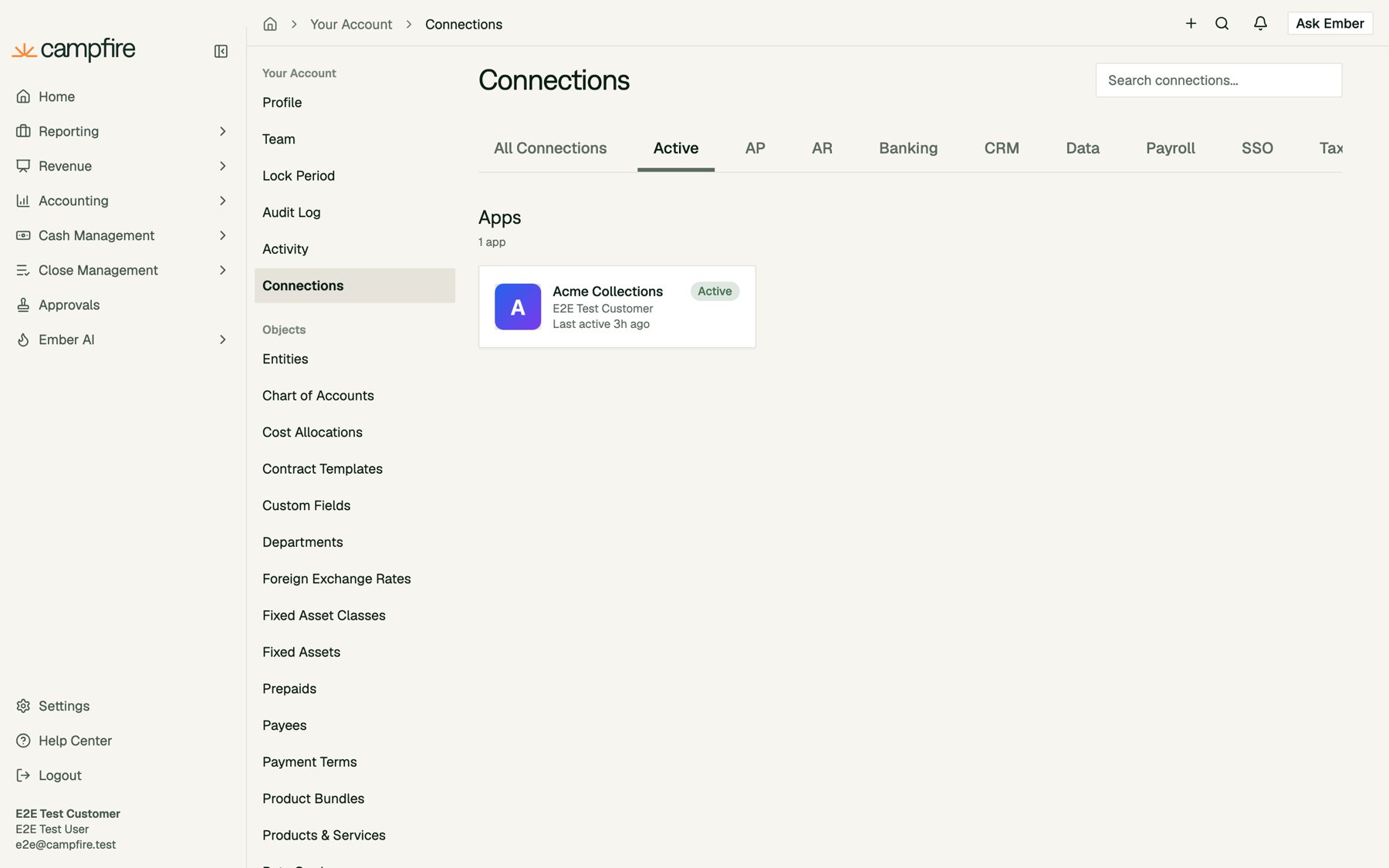 Click an app to see its description, the scopes you granted, and its **Activity** log. The log records every connection, token issue, refresh, revocation, and API request the app makes, including the method, path, and response status.
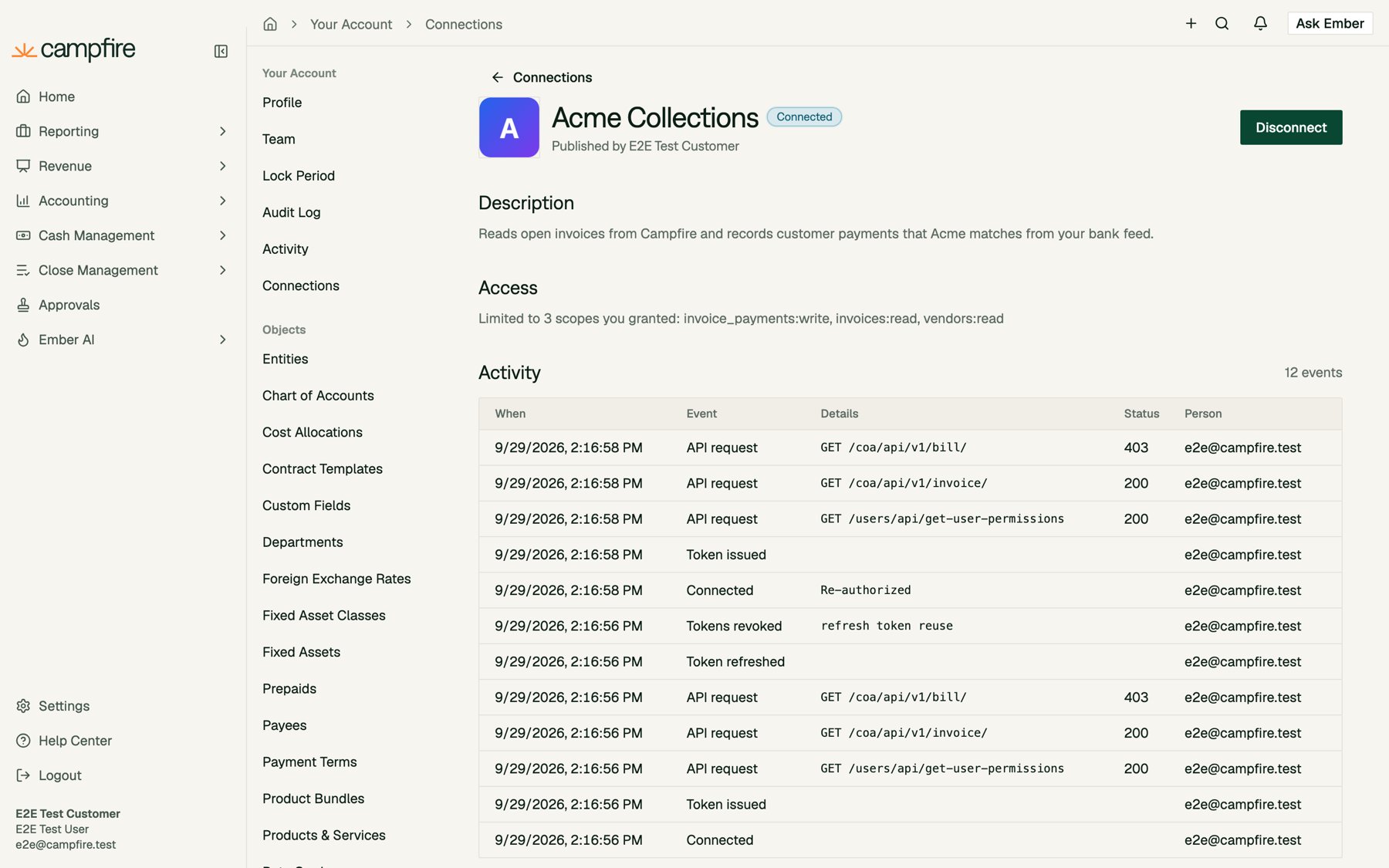 People see their own activity. Workspace admins see the activity of everyone in the workspace.
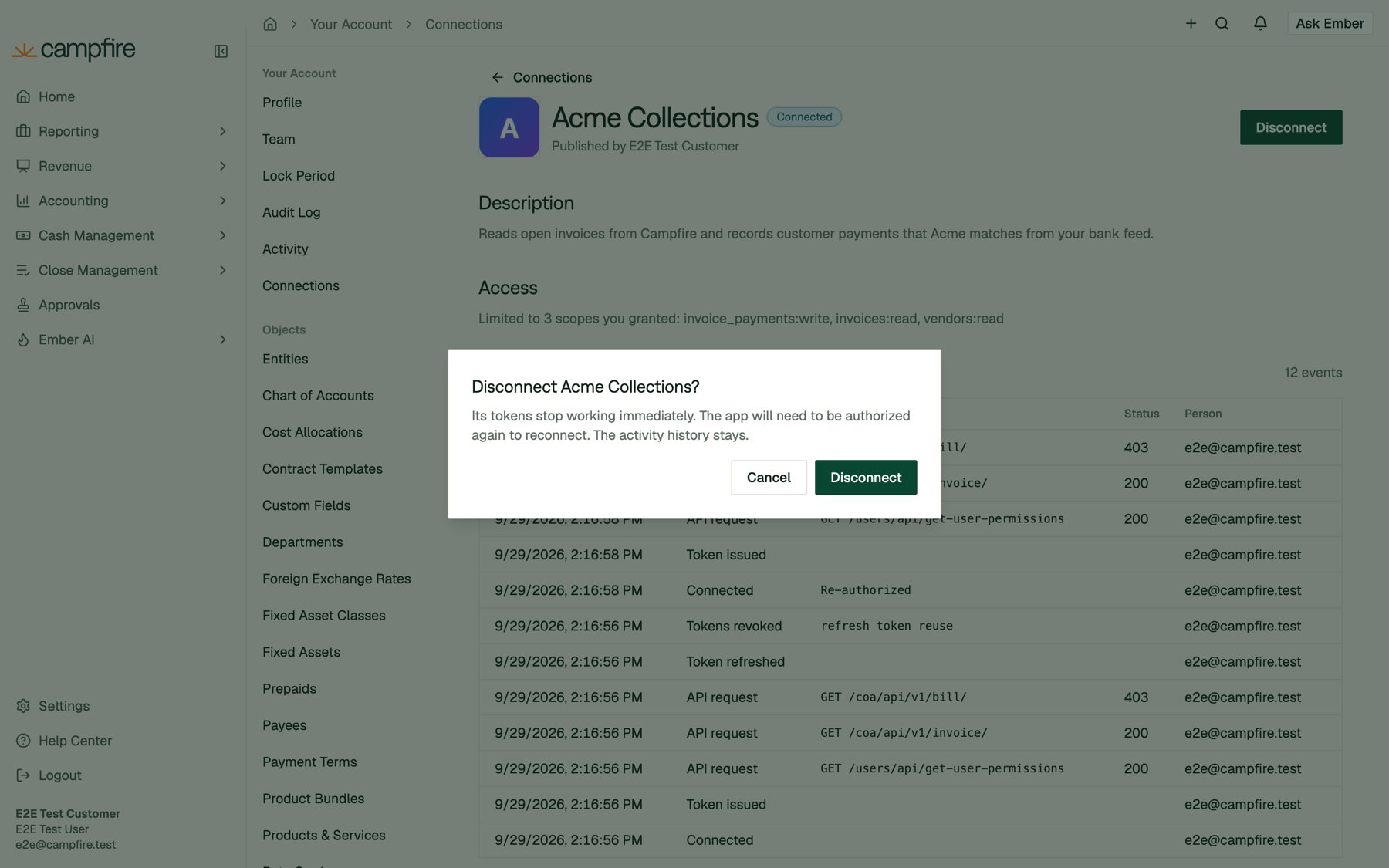
### Disconnecting an app
Click **Disconnect** on the app's connection page and confirm. The app's tokens stop working **immediately**, and it has to be authorized again to reconnect.
People see their own activity. Workspace admins see the activity of everyone in the workspace.
### Disconnecting an app
Click **Disconnect** on the app's connection page and confirm. The app's tokens stop working **immediately**, and it has to be authorized again to reconnect.
 After a disconnect, API calls with the old token return `401`:
```json theme={null}
{"detail": "OAuth app token is invalid or has expired."}
```
Your app should treat a `401` on a refresh, or on a request made right after a refresh, as a lost connection and prompt the person to reconnect.
### When access ends automatically
Besides an explicit disconnect, Campfire revokes a connection's tokens when:
| Event | Effect |
| - | - |
| The client secret is rotated | All tokens for **every** connection to the app are revoked. |
| The app is deleted | All connections are removed. |
| The app's permissions are narrowed | Each connection is trimmed to the new permissions and its tokens are revoked. A connection left with no permissions is disconnected. |
| A published app is unpublished, or loses Campfire's approval | Connections from other workspaces are disconnected. |
| The person resets their password | All of that person's app connections are removed. |
| The person is deactivated in a workspace | Their app connections in that workspace are removed. |
| The person authorizes the app again | The previous tokens are replaced. |
| A refresh token is reused | All tokens for that connection are revoked. |
Widening an app's permissions never changes existing connections. People keep what they originally granted until they authorize again.
## Part 4: Manage your app
From **Settings > Developer > Apps**, each app card has **View Credentials**, **Edit**, and **Delete** buttons.
### Rotating the client secret
Click **View Credentials**. After the first time, the secret is hidden. Click **Rotate secret** to generate a new one, which is shown once.
After a disconnect, API calls with the old token return `401`:
```json theme={null}
{"detail": "OAuth app token is invalid or has expired."}
```
Your app should treat a `401` on a refresh, or on a request made right after a refresh, as a lost connection and prompt the person to reconnect.
### When access ends automatically
Besides an explicit disconnect, Campfire revokes a connection's tokens when:
| Event | Effect |
| - | - |
| The client secret is rotated | All tokens for **every** connection to the app are revoked. |
| The app is deleted | All connections are removed. |
| The app's permissions are narrowed | Each connection is trimmed to the new permissions and its tokens are revoked. A connection left with no permissions is disconnected. |
| A published app is unpublished, or loses Campfire's approval | Connections from other workspaces are disconnected. |
| The person resets their password | All of that person's app connections are removed. |
| The person is deactivated in a workspace | Their app connections in that workspace are removed. |
| The person authorizes the app again | The previous tokens are replaced. |
| A refresh token is reused | All tokens for that connection are revoked. |
Widening an app's permissions never changes existing connections. People keep what they originally granted until they authorize again.
## Part 4: Manage your app
From **Settings > Developer > Apps**, each app card has **View Credentials**, **Edit**, and **Delete** buttons.
### Rotating the client secret
Click **View Credentials**. After the first time, the secret is hidden. Click **Rotate secret** to generate a new one, which is shown once.
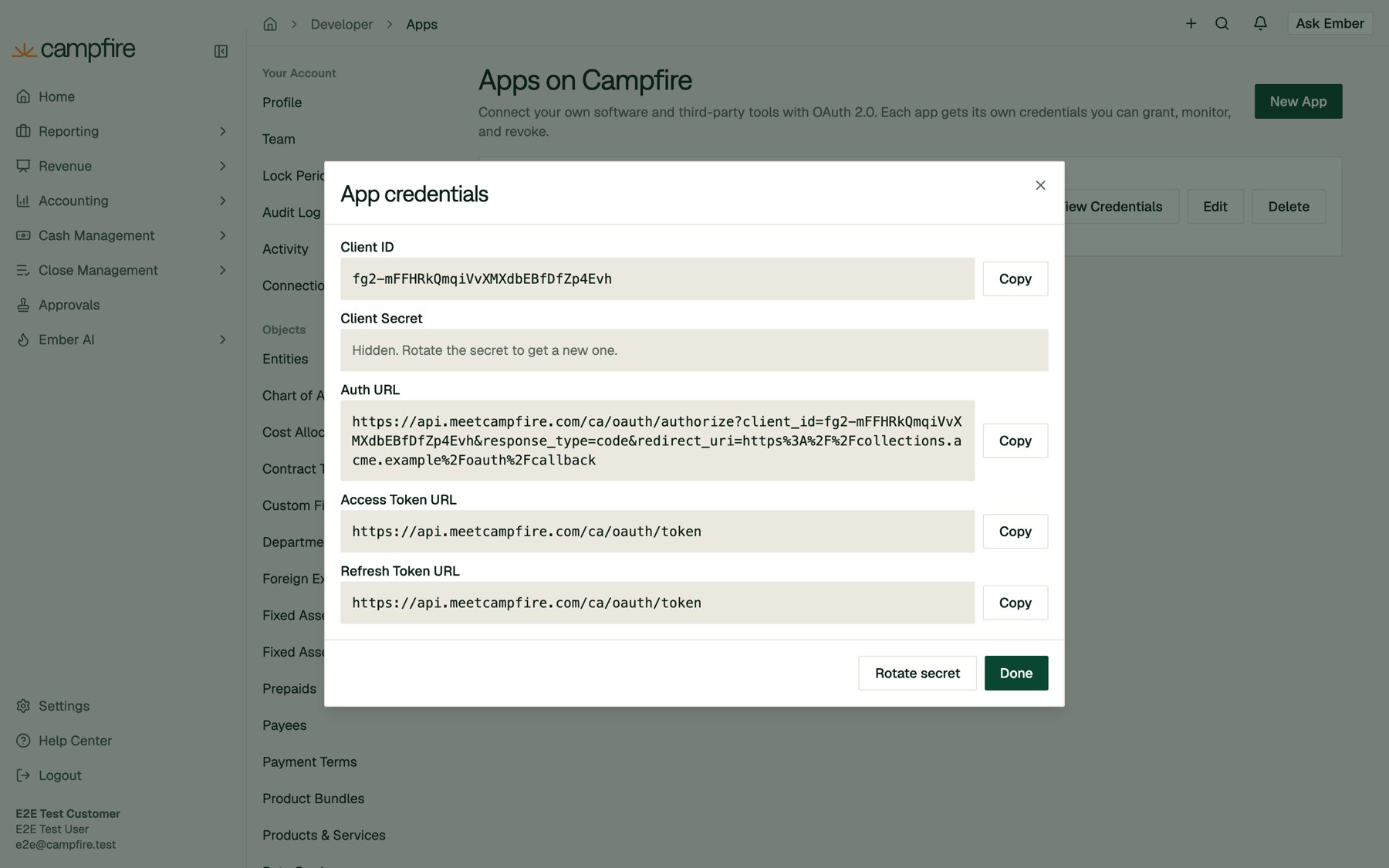 Rotating keeps the same client ID, but **immediately revokes every access and refresh token issued to the app**, across every connection. Everyone who connected will need to authorize again. Deploy the new secret right away.
### Editing and deleting
* **Edit** changes the name, tagline, description, redirect URLs, Connect URL, icon, publishing, and permissions. See [When access ends automatically](#when-access-ends-automatically) for how permission changes affect existing connections.
* **Delete** asks for confirmation. The app's credentials stop working immediately and every connection is removed. This cannot be undone.
### Private vs. published apps
| | Private (default) | Published and approved |
| - | - | - |
| Who can authorize | People in the workspace that created the app | Anyone with a Campfire account |
| Workspace at consent | Fixed to the creating workspace | The person picks any workspace they belong to |
| App card badge | **Private** | **Published** |
Publishing is a two-step process. Turn on **Published** in the app's details, and the card shows **Pending approval**. Once Campfire reviews and approves the app, it becomes **Published**. Until then it behaves like a private app. To request a review, contact your Campfire support team.
## Scopes reference
Scopes have the form `:`, for example `invoices:read` or `bills:write`. Request them space-separated in the `scope` parameter. A higher tier includes lower tiers (`write` includes `draft` and `read`). `approve` is separate and only covers itself.
The live catalog, with a human-readable description for every scope, is available from `GET https://api.meetcampfire.com/ca/api/v1/oauth-apps/scopes` using any access token.
| Resource | Scope prefix | Tiers |
| - | - | - |
| Amortizations | `amortizations` | `read`, `draft`, `write`, `approve` |
| Bill Payments | `bill_payments` | `read`, `draft`, `write`, `approve` |
| Bills | `bills` | `read`, `draft`, `write`, `approve` |
| Check Printing | `check_payments` | `read`, `write` |
| Credit Memo Payments | `credit_memo_payments` | `read`, `write` |
| Credit Memos | `credit_memos` | `read`, `draft`, `write`, `approve` |
| Debit Memo Payments | `debit_memo_payments` | `read`, `write` |
| Debit Memos | `debit_memos` | `read`, `draft`, `write`, `approve` |
| Fixed Assets, Disposals, Transfers, and Impairments | `fixed_assets` | `read`, `draft`, `write`, `approve` |
| General Ledger Transactions | `transactions` | `read`, `draft`, `write`, `approve` |
| Intercompany Journal Entries | `intercompany_journal_entries` | `read`, `draft`, `write`, `approve` |
| Invoice Payments | `invoice_payments` | `read`, `draft`, `write`, `approve` |
| Invoice Reminder Templates | `invoice_reminder_templates` | `read`, `write` |
| Invoice Reminders | `invoice_reminders` | `read`, `write` |
| Invoices | `invoices` | `read`, `draft`, `write`, `approve` |
| Journal Entries | `journal_entries` | `read`, `draft`, `write`, `approve` |
| Leases | `leases` | `read`, `draft`, `write`, `approve` |
| Resource | Scope prefix | Tiers |
| - | - | - |
| Contract Milestones | `contract_milestones` | `read`, `draft`, `write`, `approve` |
| Contract Prepaid Commits | `contract_prepaid_commits` | `read`, `draft`, `write`, `approve` |
| Contract Subscriptions | `contract_subscriptions` | `read`, `draft`, `write`, `approve` |
| Contract Usages | `contract_usages` | `read`, `draft`, `write`, `approve` |
| Contracts | `contracts` | `read`, `draft`, `write`, `approve` |
| Revenue Dashboard and Transactions | `revenue_transactions` | `read`, `draft`, `write`, `approve` |
| Resource | Scope prefix | Tiers |
| - | - | - |
| Custom Reports | `custom_reports` | `read`, `write` |
| Financial Statements | `reports` | `read` |
| Resource | Scope prefix | Tiers |
| - | - | - |
| Bank Accounts | `bank_accounts` | `read`, `write` |
| Cash Management Transactions | `bank_transactions` | `read`, `draft`, `write`, `approve` |
| Resource | Scope prefix | Tiers |
| - | - | - |
| Bank Reconciliation | `reconciliations` | `read`, `draft`, `write`, `approve` |
| Close Checklist | `close_checklist` | `read`, `write` |
| Resource | Scope prefix | Tiers |
| - | - | - |
| Audit Logs | `audit_logs` | `read` |
| Auto Categorization Rules | `auto_categorization_rules` | `read`, `draft`, `write`, `approve` |
| Chart of Accounts | `accounts` | `read`, `write` |
| Contact Titles | `contact_titles` | `read`, `write` |
| Contract Templates | `contract_templates` | `read`, `write` |
| Cost Allocations | `cost_allocations` | `read`, `write` |
| Custom Fields | `custom_fields` | `read`, `write` |
| Departments | `departments` | `read`, `write` |
| Entities | `entities` | `read`, `write` |
| Fixed Asset Automation Rules | `fixed_asset_automation_rules` | `read`, `write` |
| Fixed Asset Classes | `fixed_asset_classes` | `read`, `write` |
| Invoice Reminder Settings | `invoice_reminder_settings` | `read`, `write` |
| Invoice Settings | `invoice_settings` | `read`, `write` |
| Lock Periods | `lock_periods` | `read`, `write` |
| Payment Terms | `payment_terms` | `read`, `write` |
| Product Bundles | `product_bundles` | `read`, `write` |
| Products and Services | `products` | `read`, `write` |
| Recurring Journal Entries | `recurring_journal_entries` | `read`, `write` |
| Statistical Accounts | `statistical_accounts` | `read`, `write` |
| Tags | `tags` | `read`, `write` |
| Tax Rates | `tax_rates` | `read`, `write` |
| Users | `users` | `read`, `write` |
| Validation Rules | `validation_rules` | `read`, `write` |
| Vendors and Payees | `vendors` | `read`, `write` |
| Webhooks | `webhooks` | `read`, `write` |
| Resource | Scope prefix | Tiers |
| - | - | - |
| Ember AI | `ember_ai` | `read` |
## Errors and troubleshooting
### Authorize endpoint
If the `client_id` or `redirect_uri` is invalid, Campfire can't safely redirect back to you. It responds with `400` and a JSON `detail` instead:
| `detail` | Fix |
| - | - |
| `Unknown or inactive client.` | Check the client ID. The app may have been deleted. |
| `redirect_uri is not registered for this app.` | Add the exact URL (scheme, host, port, and path) to the app's redirect URLs. |
| `Authorization parameters are too long.` | Shorten `state` (4,096 characters max) or the other parameters. |
All other problems redirect back to your `redirect_uri` with `error`, `error_description`, and your `state`:
| `error` | Cause |
| - | - |
| `access_denied` | The person clicked **Cancel**. |
| `invalid_request` | A malformed PKCE challenge, or a `code_challenge_method` other than `S256`. |
| `invalid_scope` | An unknown scope, or one outside the app's permissions. |
| `unsupported_response_type` | `response_type` was not `code`. |
The consent screen itself can also show **Authorization unavailable**. This happens if the request expired (the person took more than 10 minutes), was already used, or the person doesn't belong to the workspace a private app is locked to. Start the flow again from your app.
### Token endpoint
Errors follow the OAuth 2.0 format: `{"error": "...", "error_description": "..."}`.
| Status | `error` | Common causes |
| - | - | - |
| 401 | `invalid_client` | Wrong client ID or secret, or the secret was rotated. |
| 400 | `invalid_grant` | The code expired (5 minutes), was already used, or was issued to a different client. The `redirect_uri` or `code_verifier` doesn't match. The refresh token is expired, revoked, or was already used. |
| 400 | `unsupported_grant_type` | Only `authorization_code` and `refresh_token` are supported. |
Reusing an authorization code, like reusing a refresh token, revokes the tokens already issued from it.
### API requests
| Status | Response | Meaning |
| - | - | - |
| 401 | `OAuth app token is invalid or has expired.` | Refresh the token. If refreshing fails, the person must reconnect. |
| 401 | `OAuth app not recognized or inactive.` | The app was deleted or deactivated. |
| 401 | `Your access to the selected workspace has been removed.` | The person no longer belongs to the workspace they chose. |
| 401 | `This app is no longer available in the selected workspace.` | A published app was unpublished or lost approval. |
| 403 | `WWW-Authenticate: ... error="insufficient_scope", scope="..."` | The token lacks the scope named in the header. Add it to the app and have the person reconnect. |
| 403 | `This endpoint is not available to OAuth apps.` | Use an API key for this endpoint instead. |
| 403 | `You do not have permission to perform this action.` (no `insufficient_scope`) | The person's own role doesn't allow the action. |
## Security checklist
* Keep the client secret on your server. Never put it in front-end code, mobile apps, or source control.
* Always send and verify `state`.
* Use PKCE (`S256`) on every authorization.
* Request the fewest scopes you need. Prefer `draft` over `write` when a human should review changes.
* Store tokens encrypted, and save each new refresh token before using the new access token.
* Handle `401` by refreshing once, then prompting the person to reconnect.
* Rotate the secret immediately if it may have leaked. This also revokes every existing token.
**Need help?** Contact your Campfire support team and we're happy to help you build your integration.
Rotating keeps the same client ID, but **immediately revokes every access and refresh token issued to the app**, across every connection. Everyone who connected will need to authorize again. Deploy the new secret right away.
### Editing and deleting
* **Edit** changes the name, tagline, description, redirect URLs, Connect URL, icon, publishing, and permissions. See [When access ends automatically](#when-access-ends-automatically) for how permission changes affect existing connections.
* **Delete** asks for confirmation. The app's credentials stop working immediately and every connection is removed. This cannot be undone.
### Private vs. published apps
| | Private (default) | Published and approved |
| - | - | - |
| Who can authorize | People in the workspace that created the app | Anyone with a Campfire account |
| Workspace at consent | Fixed to the creating workspace | The person picks any workspace they belong to |
| App card badge | **Private** | **Published** |
Publishing is a two-step process. Turn on **Published** in the app's details, and the card shows **Pending approval**. Once Campfire reviews and approves the app, it becomes **Published**. Until then it behaves like a private app. To request a review, contact your Campfire support team.
## Scopes reference
Scopes have the form `:`, for example `invoices:read` or `bills:write`. Request them space-separated in the `scope` parameter. A higher tier includes lower tiers (`write` includes `draft` and `read`). `approve` is separate and only covers itself.
The live catalog, with a human-readable description for every scope, is available from `GET https://api.meetcampfire.com/ca/api/v1/oauth-apps/scopes` using any access token.
| Resource | Scope prefix | Tiers |
| - | - | - |
| Amortizations | `amortizations` | `read`, `draft`, `write`, `approve` |
| Bill Payments | `bill_payments` | `read`, `draft`, `write`, `approve` |
| Bills | `bills` | `read`, `draft`, `write`, `approve` |
| Check Printing | `check_payments` | `read`, `write` |
| Credit Memo Payments | `credit_memo_payments` | `read`, `write` |
| Credit Memos | `credit_memos` | `read`, `draft`, `write`, `approve` |
| Debit Memo Payments | `debit_memo_payments` | `read`, `write` |
| Debit Memos | `debit_memos` | `read`, `draft`, `write`, `approve` |
| Fixed Assets, Disposals, Transfers, and Impairments | `fixed_assets` | `read`, `draft`, `write`, `approve` |
| General Ledger Transactions | `transactions` | `read`, `draft`, `write`, `approve` |
| Intercompany Journal Entries | `intercompany_journal_entries` | `read`, `draft`, `write`, `approve` |
| Invoice Payments | `invoice_payments` | `read`, `draft`, `write`, `approve` |
| Invoice Reminder Templates | `invoice_reminder_templates` | `read`, `write` |
| Invoice Reminders | `invoice_reminders` | `read`, `write` |
| Invoices | `invoices` | `read`, `draft`, `write`, `approve` |
| Journal Entries | `journal_entries` | `read`, `draft`, `write`, `approve` |
| Leases | `leases` | `read`, `draft`, `write`, `approve` |
| Resource | Scope prefix | Tiers |
| - | - | - |
| Contract Milestones | `contract_milestones` | `read`, `draft`, `write`, `approve` |
| Contract Prepaid Commits | `contract_prepaid_commits` | `read`, `draft`, `write`, `approve` |
| Contract Subscriptions | `contract_subscriptions` | `read`, `draft`, `write`, `approve` |
| Contract Usages | `contract_usages` | `read`, `draft`, `write`, `approve` |
| Contracts | `contracts` | `read`, `draft`, `write`, `approve` |
| Revenue Dashboard and Transactions | `revenue_transactions` | `read`, `draft`, `write`, `approve` |
| Resource | Scope prefix | Tiers |
| - | - | - |
| Custom Reports | `custom_reports` | `read`, `write` |
| Financial Statements | `reports` | `read` |
| Resource | Scope prefix | Tiers |
| - | - | - |
| Bank Accounts | `bank_accounts` | `read`, `write` |
| Cash Management Transactions | `bank_transactions` | `read`, `draft`, `write`, `approve` |
| Resource | Scope prefix | Tiers |
| - | - | - |
| Bank Reconciliation | `reconciliations` | `read`, `draft`, `write`, `approve` |
| Close Checklist | `close_checklist` | `read`, `write` |
| Resource | Scope prefix | Tiers |
| - | - | - |
| Audit Logs | `audit_logs` | `read` |
| Auto Categorization Rules | `auto_categorization_rules` | `read`, `draft`, `write`, `approve` |
| Chart of Accounts | `accounts` | `read`, `write` |
| Contact Titles | `contact_titles` | `read`, `write` |
| Contract Templates | `contract_templates` | `read`, `write` |
| Cost Allocations | `cost_allocations` | `read`, `write` |
| Custom Fields | `custom_fields` | `read`, `write` |
| Departments | `departments` | `read`, `write` |
| Entities | `entities` | `read`, `write` |
| Fixed Asset Automation Rules | `fixed_asset_automation_rules` | `read`, `write` |
| Fixed Asset Classes | `fixed_asset_classes` | `read`, `write` |
| Invoice Reminder Settings | `invoice_reminder_settings` | `read`, `write` |
| Invoice Settings | `invoice_settings` | `read`, `write` |
| Lock Periods | `lock_periods` | `read`, `write` |
| Payment Terms | `payment_terms` | `read`, `write` |
| Product Bundles | `product_bundles` | `read`, `write` |
| Products and Services | `products` | `read`, `write` |
| Recurring Journal Entries | `recurring_journal_entries` | `read`, `write` |
| Statistical Accounts | `statistical_accounts` | `read`, `write` |
| Tags | `tags` | `read`, `write` |
| Tax Rates | `tax_rates` | `read`, `write` |
| Users | `users` | `read`, `write` |
| Validation Rules | `validation_rules` | `read`, `write` |
| Vendors and Payees | `vendors` | `read`, `write` |
| Webhooks | `webhooks` | `read`, `write` |
| Resource | Scope prefix | Tiers |
| - | - | - |
| Ember AI | `ember_ai` | `read` |
## Errors and troubleshooting
### Authorize endpoint
If the `client_id` or `redirect_uri` is invalid, Campfire can't safely redirect back to you. It responds with `400` and a JSON `detail` instead:
| `detail` | Fix |
| - | - |
| `Unknown or inactive client.` | Check the client ID. The app may have been deleted. |
| `redirect_uri is not registered for this app.` | Add the exact URL (scheme, host, port, and path) to the app's redirect URLs. |
| `Authorization parameters are too long.` | Shorten `state` (4,096 characters max) or the other parameters. |
All other problems redirect back to your `redirect_uri` with `error`, `error_description`, and your `state`:
| `error` | Cause |
| - | - |
| `access_denied` | The person clicked **Cancel**. |
| `invalid_request` | A malformed PKCE challenge, or a `code_challenge_method` other than `S256`. |
| `invalid_scope` | An unknown scope, or one outside the app's permissions. |
| `unsupported_response_type` | `response_type` was not `code`. |
The consent screen itself can also show **Authorization unavailable**. This happens if the request expired (the person took more than 10 minutes), was already used, or the person doesn't belong to the workspace a private app is locked to. Start the flow again from your app.
### Token endpoint
Errors follow the OAuth 2.0 format: `{"error": "...", "error_description": "..."}`.
| Status | `error` | Common causes |
| - | - | - |
| 401 | `invalid_client` | Wrong client ID or secret, or the secret was rotated. |
| 400 | `invalid_grant` | The code expired (5 minutes), was already used, or was issued to a different client. The `redirect_uri` or `code_verifier` doesn't match. The refresh token is expired, revoked, or was already used. |
| 400 | `unsupported_grant_type` | Only `authorization_code` and `refresh_token` are supported. |
Reusing an authorization code, like reusing a refresh token, revokes the tokens already issued from it.
### API requests
| Status | Response | Meaning |
| - | - | - |
| 401 | `OAuth app token is invalid or has expired.` | Refresh the token. If refreshing fails, the person must reconnect. |
| 401 | `OAuth app not recognized or inactive.` | The app was deleted or deactivated. |
| 401 | `Your access to the selected workspace has been removed.` | The person no longer belongs to the workspace they chose. |
| 401 | `This app is no longer available in the selected workspace.` | A published app was unpublished or lost approval. |
| 403 | `WWW-Authenticate: ... error="insufficient_scope", scope="..."` | The token lacks the scope named in the header. Add it to the app and have the person reconnect. |
| 403 | `This endpoint is not available to OAuth apps.` | Use an API key for this endpoint instead. |
| 403 | `You do not have permission to perform this action.` (no `insufficient_scope`) | The person's own role doesn't allow the action. |
## Security checklist
* Keep the client secret on your server. Never put it in front-end code, mobile apps, or source control.
* Always send and verify `state`.
* Use PKCE (`S256`) on every authorization.
* Request the fewest scopes you need. Prefer `draft` over `write` when a human should review changes.
* Store tokens encrypted, and save each new refresh token before using the new access token.
* Handle `401` by refreshing once, then prompting the person to reconnect.
* Rotate the secret immediately if it may have leaked. This also revokes every existing token.
**Need help?** Contact your Campfire support team and we're happy to help you build your integration.